Photonic

Photonic
License:
Free to try
Language:
English
Developer:
OS:
Mac OS X
Updated:
See detailed info

Softonic review

Cyril Roger

“A Mac Flickr desktop client”

by Cyril Roger about Photonic

Flickr is a great site to publish pictures or simply browse photos. While you can upload your photos directly to the site, it may be easier to use a desktop application.

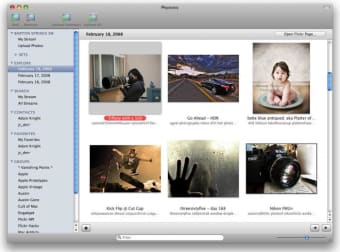
Photonic is a bit more than a simple Flickr uploading tool. Consider it a full fledged client to browse the website and your photos from your desktop. You can organize and select the photos to upload to Flickr directly from its sleek interface. The GUI is well built and pictures are easy to browse through. Photonic also shows tags and titles for each photo.

What I really like about Photonic is how natural it makes browsing Flickr and your photos from your desktop. From the list on the left side of the interface you view your sets, contacts, groups and even search and explore by date, tag or keyword. In all, Photonic aims to make it unnecessary to go to the Flickr website.

The only trouble is that Photonic is still a little unstable and the odd behaviour can happen every now and then. We'll have to wait for a proper 1.0 release for a stable version of the program.

Still in Beta mode, Photonic is a promising desktop client for Flickr, with a very nice interface.

Pros
  • Beautiful interface
  • Multiple ways to browse photos
Cons
  • Can be unstable
Download Photonic 1.0.1 Beta 4

Photonic is virus free

We have analyzed the latest version of Photonic with 30 antivirus engines and it is virus free. See analysis results.

TESTED VIRUS FREE - Softonic GUARANTEED

Developer's description

Working with a lot of photos to upload can be a pain, especially with any sort of web-based interface. No matter how well-designed the interface is, you're still in a web browser and suffer from the limitations therein. The answer to effectively organizing and uploading tens, or even hundreds, of photos to Flickr is to use a desktop application specifically designed to help you accomplish this task. Enter Photonic.

In addition to letting you upload your photos in an easy and Mac-like fashion (complete with snappy, snazzy, and non-gratuitous Core Animation feedback), Photonic is also a Flickr browser. Keep track of your contacts, groups, and even the past several days in Explore, all from Photonic. When you care to interact with a photo, double-click on it and you'll be taken straight to the page on Flickr where you can read and leave comments as usual. Photonic supplements your already-excellent Flickr experience — we'd never try to take it away.

Review and rate Photonic

Your avatar

Your opinion is important.
Help other users - be the first to review this program.

Review
  1. Maximum: 75 characters

  2. See example

Pros and Cons
Rate
  1. What rating would you give Photonic?

    You need to fill in all fields

    • Usability:

      Not rated
    • Stability:

      Not rated
    • Installation:

      Not rated
    • Functionality:

      Not rated
    • Appearance:

      Not rated
    • Overall rating:

      Not rated
  2. Don't worry, we won't make your email address public.

You're not allowed to share serial numbers, cracks, etc. or link to pages that contain them. If you do, your user account will be deleted, your IP address logged and legal action will be taken.

Get started - just ask a question!

Write a title for your question.

Alternativesto Photonic

  • In English:
    JustLooking
    JustLooking

    Quickly preview your photos

    Softonic rating:
    • 8/10
    User rating:
    • 10/10
  • Better rating:
    Picasa
    Picasa

    Google's answer to iPhoto

    Softonic rating:
    • 10/10
    User rating:
    • 8/10
Compare with Photonic
Download rank: Photo Albums & Viewers

34 of 70

Softonic rating:
  • Good
  • 7/10
Your rating:
Your rating
  • 0

Review and rate this program

Top Downloads: Photo Albums & Viewers

  • United States
  • Global

  1. Google's answer to iPhoto

Older versions of Photonic